Remove Shutdown Option From Start Menu


You might be using some shortcut / shortcut keys for performing Shutdown and you don't the Shutdown option in Start Menu . If the case is so , just follow the following steps.

1: Goto Run and type gpedit.msc
2: Navigate to User Configuration->Administrative Templates->Start Menu &Taskbar
3: Find the option 'Remove Shutdown on Start Menu' and set is as 'Enable'.


Enjoy

Display a Logon Message ( Display message when someone logs in )


Method 1 ( Registry Tweaking ) :

1: Start Registry Editor ( Start >> Run >> type "regedit" >> Hit enter.
2: Navigate to: HKEY_LOCAL_MACHINE \ SOFTWARE \ Microsoft \ Windows NT \ CurrentVersion \ Winlogon
3: Change the text in LegalNoticeCaption to set the text for the title of the message window that will be displayed.
4: Change the text in LegalNoticeText to set the actual message you wanted displayed.
5: The settings will take effect when someone logins the system next time.

Method 2 ( Using Administrative Tools ) :

1: Click Start >> Control Panel.
2: Click System and Maintenance, Administrative Tools and then the Local Security Policy.
3: Within the console, expand Local Policies.
4: Click Security Options. The various security options are displayed in the details pane.
5: Scroll through the options and locate Interactive Logon: Message text for users attempting to log on.
6: Double click the security option.
7: Type in the message text that you want users to see.
8: Click OK.
9: The settings will take effect when someone logins the system next time.

Enjoy...

See Deleted File History


Follow the steps:

1. Boot into "safe mode command prompt" using F8
2. Go to Root (C:\) by typing CD\
3. Now type C:\ del index.dat /s
4. Press ENTER
The deleted files will appear.

Enjoy...

Disable or Enable Folder Options in XP


Folder options are very important when a system is shared between users. One of the main functionality that can be changed from folder options is to view hidden or/and super hidden files and folder in Windows XP, some times it happens because of virus too.

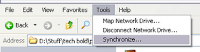
Before


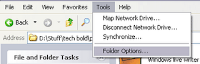
After


So, if you share your system among multiple users, it is advisable to disable the folder options in Windows XP.

1: Start->Run->"gpedit.msc"

2: Navigate to "User Configuration >> Administrative Templates >> Windows Components >> Windows Explorer.

3: Finally, on the right enable the option of "Remove the Folder Options menu item from the Tools Menu" by right clicking on it and selecting disable.

Eenjoy...

Enable / Disable Regedit (Registry Editing Tool) in XP


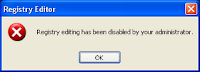
Sometimes because of a virus or some software, the registry editing tool "regedit" ( Accessed by Start >> Run >> "regedit" ), gets disabled. This is quite irritating as you get this message when you try to access "regedit".


Also sometimes, you might want to restrict users to change registry.

Here is a solution for the same :

1: Open gpedit tool ( Start >> Run >> "gpedit.msc" )

2: Navigate to User Configuration >> Administrative Templates >> System

3: On the right side double click on "Prevent Access To Registry Editing Tools".

4: Select Enable/ Disable and you are done.

Enjoy...

Remove the Username or User Pic from Start Menu


(1) Remove Username :

Start> Run> regedit.exe and navigate to the this key:

HKEY_CURRENT_USER \ Software \ Microsoft\ Windows \ CurrentVersion \ Policies \ Explorer

In the right-pane, set NoUserNameInStartMenu value-data to 1

Close Regedit.exe and restart Windows.

(2) Remove the user name and user account picture from Start Menu, in order to have a blank blue panel at the top, try this:

Start Windows Explorer and go to this folder:
C:\Documents and Settings\All Users\Application Data\Microsoft\User Account Pictures

From that folder, rename the BMP file which corresponds to your user account. ( For example, if your username is avi, rename avi.bmp to old_avi.bmp )

Next, rename the following folder:

C:\Documents and Settings\All Users\Application Data\Microsoft\User Account Pictures\Default Pictures to something else, say...

C:\Documents and Settings\All Users\Application Data\Microsoft\User Account Pictures\No_Default Picture.

Enjoy...

Prevent failed DNS lookups from getting cached

DNS (Domain Name System) caching is used to resolve hostnames for faster access. The problem with this feature is that failed DNS lookups also get cached.

To change so that it will not cache failed DNS lookups...

Step 1: Flush the DNS cache manually

Go to the Command Prompt
Enter ipconfig /flushdns

Step 2: To permanently solve, modifing the Registry

Click Start
Click Run
Enter regedit
Click OK

Go to
HKEY_LOCAL_MACHINE > SYSTEM > CurrentControlSet > Services > Dnscache >Parameters

Change following Parameters the the values as given bellow:

NegativeCacheTime=0 (DWORD default=300 seconds)

NetFailureCacheTime=0 (DWORD default=30 seconds)

NegativeSOACacheTime=0 (DWORD default=120 seconds)

Step 3: Restart Computer

Increase Trial Period For Trial Version Software Forever


RunAsDate is a small utility that allows you to run a program in the date and time that you specify. This utility doesn’t change the current system date, but it only injects the date/time that you specify into the desired application.
RunAsDate intercepts the kernel API calls that returns the current date and time (GetSystemTime, GetLocalTime, GetSystemTimeAsFileTime), and replaces the current date/time with the date/time that you specify. It works with Windows 2000, XP, 2003 and Vista.
NOTE: FOLLOW THESE TIPS CAREFULLY
You have to follow these tips carefully to successfully hack a software and make it run in it’s trial mode forever.
1. Note down the date and time, when you install the software for the first time.
2. Once the trial period expires, you must always run the software using RunAsDate.
Download Software From here....
3. After the trial period is expired, do not run the software(program) directly. If you run the software directly even once, this hack may no longer work.
4. It is better and safe to inject the date of the last day in the trial period.
For example, if the trial period expires on jan 30 2009, always inject the date as jan 29 2009 in the RunAsDate. I hope this helps! Please express your experience and opinions through comments.
Enjoy...

Folder which can't be created in Windows and it's crack

Folders with name: CON, PRN, AUX, CLOCK$, NUL, COM1, COM2, COM3, COM4, COM5,COM6, COM7, COM8, COM9, LPT1, LPT2, LPT3, LPT4, LPT5, LPT6, LPT7, LPT8, & LPT9 cant be created using Windows Explorer or Command Prompt directly!

Try creating them anywhere and you will fail . This is prevented as XP terms these folders as SYSTEM Folder Names reserved only for the Operating System.

But there is a trick to create them (using command prompt ) :

Open command prompt by typing cmd in run window & type : md \\.\\C:\con . 

Start Button Rename Windows XP

Step 1 – Modify Explorer.exe File In order to make the changes, the file explorer.exe located at C:\Windows needs to be edited. Since explorer.exe is a binary file it requires a special editor. For purposes of this article I have used Resource Hacker. Which is used to view, modify, rename, add, delete and extract resources in 32bit Windows executables and resource files (*.res). To download it CLICK HERE

First make a backup copy of the file explorer.exe located at C:\Windows\explorer. Place it in a folder somewhere on your hard drive where it will be safe. Start Resource Hacker and open explorer.exe located at C:\Windows\explorer.exe.Now navigate to the String Table. Now click on 37 and then on 1033 as shown in the figure.


Instead of “start” just write the word you want to replace with start. Like “Solution”.

Now click to compile script button and then save the altered file bye any name you wish like explorerchanged.exe using the Save As command on the File Menu. Do not use the Save command .


Step 2 – Modify the Registry

Go to start , navigate to Run and type regedit in the Open: field. Navigate to: HKEY_LOCAL_MACHINE\ SOFTWARE\ Microsoft\ Windows NT\ CurrentVersion\ Winlogon In the right pane , double click the Shell entry to open the Edit String dialog box as shown in Fig. 06. In Value data: line, enter the name that was used to save the modified explorer.exe file. Click OK.


After rebooting your system you will see your text on the Start button

>

Another Way Simple With Software

To Download Software Click here

Install software and Run, Type Your Text and have fun...

Enjoy...

Boilsoft Video Joiner 6.34.0.0 + Splitter 6.11 • Inc Serial patch

Boilsoft Video Joiner, is a powerful video merger to join AVI, MPEG, MPG, VOB, RM/RMVB, 3GP, ASF, WMV, WMA , MP4, MP4a, MKV or FLV files,etc. to one "non-stop" file. Our video joiner, merger have provided you with Direct Stream mode and Encode mode to merge your videos more efficiently, and supports joining different format videos together at super speed.

AVI Joiner, MPEG Joiner, RM Joiner, WMV/ASF Joiner, 3GP Joiner, MP4 Joiner, MKV Joiner, FLV Joiner, MP4a Joiner, RMVB Joiner, VOB Joiner all-in-one.

Download AVI/MPEG/RM/WMV/FLV/MKV Joiner/Merger now!

Features

* Direct Stream Clone Mode joins same type files in super speed.
* Re-encode Mode joins any different format files as you like.
* Support join AVI, DivX, MPEG-4 files.
* Support join MPEG-1 and MPEG-2 video files.
* Support join VOB video files.
* Support join RM, RMVB files.
* Support join ASF, WMV, WMA files
* Support join 3GP(.3gp, .3g2) files
* Support join MP4(.mp4, .m4a, .m4v) files
* Support join MKV files.
* Support join FLV, MTS files in Re-encode Mode.
* Support join MPEG Audio and Windows Media Audio.
* Join video files as many as you want.
* Scramble and rearrange the video clips in the sequence that you exactly desire.
* Very User-friendly interface.
.......................................................................................................... 
Boilsoft Video Splitter v6.11
Boilsoft Video Splitter is a powerful video cutter to split, cut or trim a large AVI, MPEG, RM, ASF, WMV, 3GP, MKV, FLV or MP4 Video file into smaller video clips without re-encode. Video splitter and video cutter software has the bulit-in video player, you can easily split/cut AVI, MPEG, RM, ASF, WMV, 3GP or MP4 video file by time or the selection as needed.

Our Video Splitter is a superb video cutting software which helps you to cut video fornats such as AVI, MPEG, RM, ASF, WMV, 3GP, MKV, FLV or MP4 video files into small parts.

Direct stream cut, without re-encode, our Video Splitter, as a best video cutter, is the most efficient and fastest in the market.

Video Splitter, Video Cutter-- AVI Splitter, MPEG Splitter, RM Splitter, ASF Splitter, WMV Splitter, 3GP Splitter, MP4 Splitter, FLV Splitter, MKV Splitter all-in-one!

Features

* Direct stream cut, without re-encode.
* Support splitting AVI, Divx, MPEG-4 video files
* Support splitting MPEG-1, MPEG-2, VOB video files.
* Support splitting ASF, WMV, WMA files
* Support splitting Real Media(.rm, .rmvb)
* Support splitting MP4(.mp4, .m4a) file
* Support splitting 3GP(.3gp, 3g2) file
* Support splitting MKV, FLV videos
* Support splitting VCD (.dat) file
* Support splitting AC3 file
* Support splitting MPEG Audio file, mp1, mp2, mp3
* Support large video file, even large then 2GB.
* Very fast and without any quality loss.
* Very User-friendly interface.

.......................................................................................................... 
Download link:

Ultra Video Joiner Converter 5.2.0108.rar


Ultra Video Joiner 6.2.0411


Ultra Video Joiner is a professional video file joining tool which join or merge multiple video files into a large one like AVI Joiner, MPEG Joiner, WMV Joiner, RM Joiner, MP4 Joiner etc.
The Movie Joiner supports so many video formats including AVI, Divx, XviD, MPEG, WMV, ASF, RM, MOV, 3GP, MP4, FLV, MKV formats. You can add an unlimited number of video files to the list and easily rearrange their order if needed , then merge the videos files to AVI, Divx, XviD, MPEG, VCD, SVCD, DVD, WMV, MP4, FLV formats.
You even can use it to convert a single file. It also supports join video files to VCD/SVCD image and DVD-Video files, so you can burn them into one VCD/SVCD/DVD disc easily by using third-party burning tools.
It already includes all video encoders and decoders , you don't need to download any other codecs to make it work. With just a few mouse clicks, you can enjoy your movie clips without .


Download link:
http://www.mediafire.com/?dyzvukon2ln